Menu

Labels

Showing posts with label Freecad. Show all posts

Friday, 20 March 2020

Freecad (tip) - Sketcher default orientation

If you are new to Freecad, switching from other software, etc., you may find you're self in a tricky situation while you are in sketch mode. What I mean by that is the habit we get overtime, while we are in 3D mode and rotate things around.

As in the following image, we can see how the default sketch does look like. "Top" view, of course.


But, as I mentioned, we may accidentally move the mouse, while holding the buttons, and orientation is "lost", so to speak. The reason is, sketch mode, by default, does not have a fixed orientation. Same situation is within other software.
So, if you got your self in the situation as in the image below:


all you have to do is to go to the Sketch menu, and select "View sketch".
>> Sketch -> View Sketch


Or, simply click the same icon, which is available on the toolbar.


Sunday, 18 February 2018

30 FreeCad tutorials - Product design

Here are 30 FreeCad tutorials, made for a product design learning purposes.
Please note, that, these tutorials are, at the moment, for demonstration purpose!

Website, TutorialField, is still under development, so, all tutorials made untill now, will be in-depth explained. I understand how at the beginning, or at getting started, as with any similar software, can be frustrating with not having any guiding, along with tutorial. In future tutorials, that i will be making, i'll add, as far as can, if not the full guidance, then, at least major explanations, regarding specific product i'm making.

Along with this tutorials, i'll will be covering architectural tutorials, as far as my industrial design field allows me to. How many tutorials will be made, there's no specific number, because, even with this 30 full designing length type tutorials, i'm not even scratching the surface. 
One more important thing that i should mention is, do not consider all methods i've used within these tutorials for granted. But use them, rather, only for learning, or, for familiarization purpose. Learning curve is something that gives the answers in time, consequently, we'll get familiar with the correct usage of tools.
This is only the first part, there will be a lot more.


These tutorials can be found at »TutorialField« YT channel.


Thursday, 16 November 2017

Freecad tutorial - Product design #012 - Knife (modeling _demo.)

Most of the these product tutorials, are not fully made products to be produced, but, rather ability of what we can do. Anyone can continue to experiment further, and i'll be happy to see any results made, or even finished products. Still, there's a lot of products to upload, before i go over to the next step, where i'm going to include more elements, regarding quality of tutorials, and what material are in them, from what we all can learn from.


This is another, fairly simple, knife model. If we're going to model a knife, this way, there are just a few steps to consider. The other part, are standards or rules, regarding specific model we must follow.


Sunday, 12 November 2017

Freecad tutorial - Product design #011 - Hair Brush (modeling _demo.)

One more common product on the market.
When i started modeling this hair brush, i thought i'll do it below 10 minutes, it turns out, it's the longest one. But i do want to keep tutorials as shortest possible.
Again, this tutorial is demonstrational, but one that requires narrating. I'll cover those in time. Methods, or, order of steps i used, it might be difficult to understand, but it might also have a logic as modeling progresses throught the video.
In this tutorial, you could find some useful technics to use or learn, or to know about, as in any other tutorial throughout this product design series.


Thursday, 9 November 2017

Freecad tutorial - Product design #010 - Salt Shaker (modeling _demo.)

In this video, i've made simple salt shaker concept. Another aproach to specific product i wanted to try modeling, or, i'm intersted in.
Within this product, all parts are kept as simple as can be, but, as a whole product, they'll form nice, simple and stylish product. Another thing i'm interested in, is Freecad ability to present product to customer, without using other software. Customer, or client, may require some sense of realism of the product. We'll do what we are able to do, in shortest time possible, minutes... seconds... depends on situation. Freecad is able to do that for us. I intentionally recorded a bit longer first part of this video, for this very reason.

I also must say, that, this type of tutorial is required to have some sort of talk, or me to explain some steps, but i'll keep this tutorial series for demonstrational purposes. Complete tutorials, so to speak, i will upload occasionally, or simultaneously with these ones.

Sunday, 5 November 2017

Freecad tutorial - Product design #009 - Faucet (modeling _demo.)

In this video, i'm modeling a simple faucet shell, as concept only, not the interior.
I've used one simple, and modern, design concept.
I was most interested in ability to model this type of products, doesn't have to be faucet. Also, how fillets and tickness can handle each other.
Still, this faucet model is parametric, but i'll do more experimentations on organic shapes. By modern standards, there shoud be no limitations in designing and bringing the ideas to life.
If we're going to model this kind of products, we must take in consideration technical stuff. I'll be more specific in the future.


Thursday, 2 November 2017

Freecad tutorial - Product design #008 - Bottle (modeling _demo.)

In this tutorial, i've modeled very simple bottle design. A purpose of this video is to test features, mainly tickness and fillet. This video shows how this features are working, in a situations which aren't very complicated. But, these two features, as i am familiar, must work together in a strict way. As for now, i can give one simple advise, and that is, tickness must be smaller then fillet radius.


Wednesday, 1 November 2017

Freecad tutorial - Product design #007 - Hammer (modeling_ demo.)

This is a hammer concept. Model is experimental, and not finished.

It might be confusing with the order of steps i've used. Reason is, it is required to think few or many steps ahead. Some steps i've used intentionally, as i must test, or use specific approach, so i could achieve required shape.

For some steps, within video, specific tools already exist, but, after couple attempts i decided to do those steps manualy, so to speak.

Hammer is common product on the market. Thus, we are all familiar we this tool, but we are not always familiar with the features of the product, to which we don't really pay attention, not ,in general, realted to the hammer.
Maybe in future tutorials i'll actually model a hammer with features we must be familiar with, if we're going to model a real hammer.


Sunday, 29 October 2017

Freecad tutorial - Product design #006 - Screwdriver (modeling _demo.)

This is the screwdriver concept. It can be used one handed, or more often with two hands. Even with the most common tools used, at least some knowledge of human anatomy is required. Handle, should be modeled having those things in mind.
With this model, it's easier, for me, to have every single part, or feature, available for adjusting. This is the major reason why the whole handle has to be modeled out of the parametric shapes. And to avoid using other methods.
Anyhow, approach to screwdriver modeling can vary, and specific approach, might be, or depends by the reason of usage.

Thursday, 26 October 2017

Freecad tutorial - Product design #005 - Fork (modeling _demo.)

Fork! All mighty fork! An everyday tool...

I'm not sure if this is the best way to model the pork, but, it did the job. While i was in a process of modeling, i had too many issues in dealing with geometry and parameters. This video shows only whats working. So, it may seem it works all well, but within process, if steps doesn't follow what geometry expects, it just won't work.

To avoid this problems, there is one option for refining geometry, in a way to make resolution, or tessellation, of an object, heavier, so to speak, i think... I'll make another tutorial soon, i hope, and show exactly what i meant, and in what kind of situations this occur, as well how to solve this kind of problematic situations.

This problems will happen more often if we are modeling some sort of organic shapes.


Tuesday, 24 October 2017

Freecad tutorial - Product design #004 - Door|Gate Latch (modeling _demo. + animation)

This is another product which, pretty much, is  common, or known on the market. Gate, or door latch, exist in so many versions, or designs, you can't count them, function is the same, but mechanism, too, can vary from model to model.
***
I have already prepared many products, and modeling workflow, for uploading. Some of them will be covered with guides, some are without, but it will be useful to many. Many tutorials helped me just by looking at the process of making it...

For situations, which are too complicated to understand by watching only, i'll upload them separetly, with guides. 
***
Even within the simplest designs, like this one is (more-less), in designing or modeling process, problems are normal. We can solve them, by using tools available. And there are milion ways we can use them. We just seek for the cleanest solutions. Solving those problems, requires practice. Our approach is done by our logic, and, for that we must be familiar with the tools we are using...


Thursday, 19 October 2017

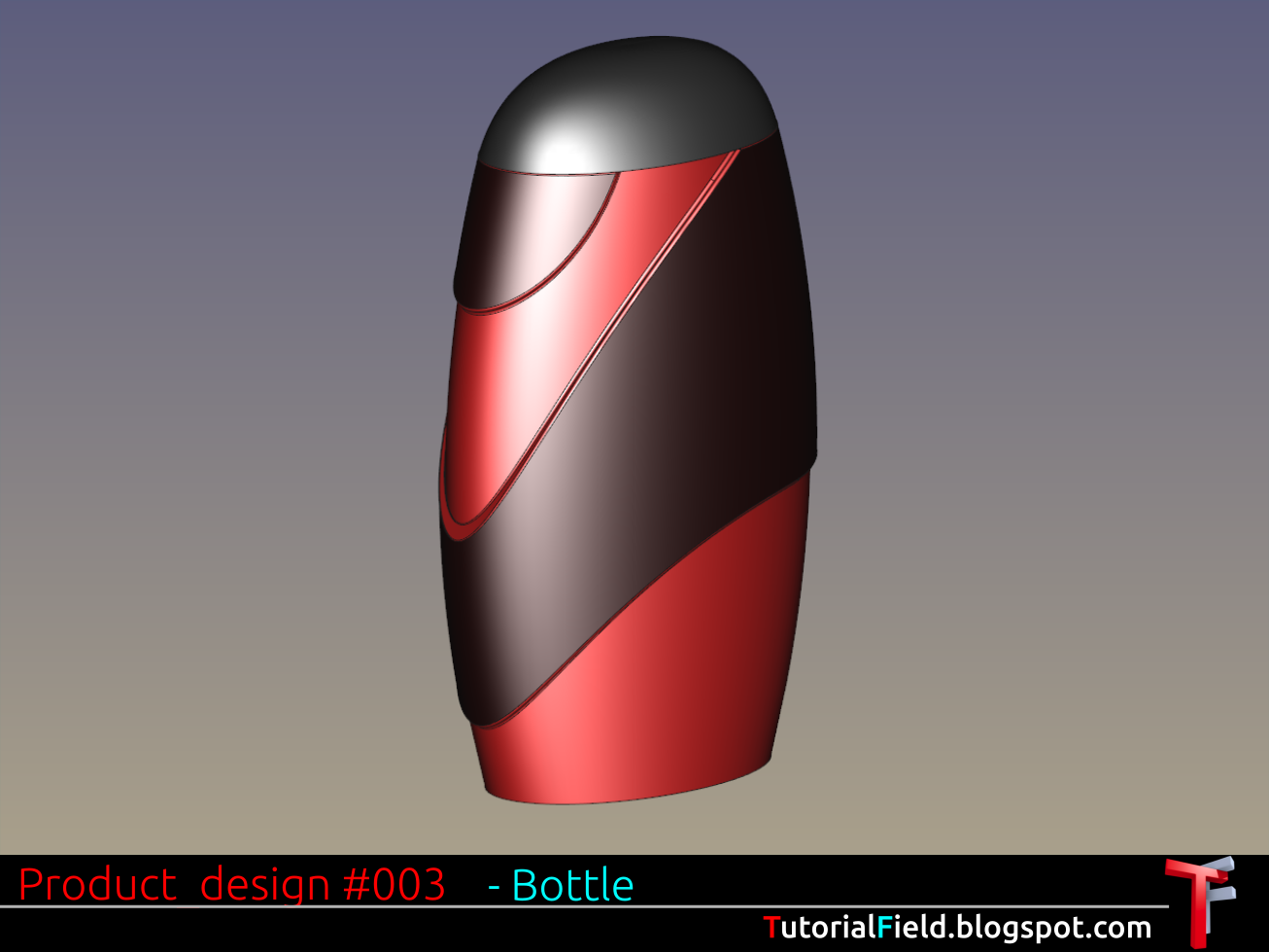
Freecad tutorial - Product design #003 - Bottle (Modleing _demo.)


A bottle, maybe one of the most covered subjects in designing. As i remember, from the time getting into industrial design, there was the whole one period of bottle studying, for students, and for teachers, or professors. Students did have problems with the bottles, and teachers with the student bottles, they were not always the good ones.
But then comes 3d modeling, how to start the "thing" already, just ain't gonna start by watching. I had a fun time, that's for sure.

Now, with this video, i wanted to show the way on how to model comlex shapes by using primitives, or a bit more complex primitives.
It's all in a logical order, by adding or subtracting parts of a material.
If, from a designed model, we can recognize more objects, like those primitives are, than the model will be made of more simple parts in one combined object.

Technic requires practicing, but in the end, it gives us ability to create complex organic shapes, if design requires it.


Wednesday, 18 October 2017

Freecad tutorial - Product design #002 - Rotary switch knob (modeling _demo.)

This is another demonstration of a product design i did, in a video is the rotary switch knob concept only.

For this specific model, i had a problem in ribs modeling. Ribs that were made straight, so to speak, by 90° degrees angle, are easy to make, but, in this situation, where ribs have to follow an angle, i had to think for a while. So, i made one solution shown in a video.


I wanted to make this video shorter, but, i decided to upload the full lenght, and i'll problably record tutorial for any specific problem in a far shorter video, or videos.


Monday, 16 October 2017

Freecad tutorial - Product design #001 - Handle (modeling _demo.)


This is only demonstration of a workflow i used in modeling this handle design.
This is not learning tutorial, but if anyone can learn even some small tip, i'll be glad. If there's a need for specific tutorial, i'll cover them in a very near future.

This is a simple design, but, i had a lot of problems while i was making it in the Freecad. Once the problems are known, it can be done without any minor problems, or, crashing, freezing and so on.


Problem was to achieve an organic shape. The least painful way was to use simple forms, and combine them in one unique shape, and, no usage of splines, or, surfaces. This way, i had a lot more control over every segment of a model.
There's a ton, so to speak, of a designs a'm going to upload, all of them had a specific issue in making process.


Thursday, 12 October 2017

Freecad tutorial - part 01_11 - Getting started | Alignment | Assembly #003


The file used in tutorial can be downloaded at the following link:
http://goo.gl/jsFdpc

This tutorial certainly doesn't cover all there is, that is related to the Draft Move tool, but, covers basic usage in general. In the following tutorials i'll try to go through other related tools and features, which may explain more clearly how does this tool works. Anyone, of course, can take some time and experiment with the tool, which is can be quite efficient in learning.

To get complete sense of this tool, it's good advice to get familiar with the Draft workbench. As soon we get familiar with the environment, sooner we're going to learn other tools, as well, predict certain procedures and steps, thus, the end result, or possible errors to occur.

Another thing to mention is workflow. While we are at working process, it's very useful to know shortcuts. This technic can give us very fast workflow, once we get used to it.


Thursday, 5 October 2017

Freecad tutorial - part 01_10 - Getting started | Draft Move tool (quick overview))

  This tutorial certainly doesn't cover all there is, that is related to the Draft Move tool, but, covers basic usage in general. In the following tutorials i'll try to go through other related tools and features, which may explain more clearly how does this tool works. Anyone, of course, can take some time and experiment with the tool, which can be quite efficient in learning.

  To get complete sense of this tool, it's good advice to get familiar with the Draft workbench. As soon we get familiar with the environment, sooner we're going to learn other tools, as well, predict certain procedures and steps, thus, the end result, or possible errors to occur.

  Another thing to mention is workflow. While we are at working process, it's very useful to know shortcuts. This technic can give us very fast workflow, once we get used to it.

Saturday, 30 September 2017

Freecad tutorial - part 01_09 - Getting started | Assembly #002

   With this tutorial, i have covered some part of the assembling in Freecad, but only as first method, i covered some tools, earlier navigation as well. There is a lot more to go thorugh, but i'll go point by point, so to speak.
   Next i'll try to explain Move and Rotate tools, a bit more detailed, since i have just touch them throughout this tutorials so far.
   Tools, by it self, can't do much, but, If they are used wisely, and for sure combined, there is no end to the variety of what those tools can do.


Wednesday, 27 September 2017

Freecad tutorial - part 01_08 - Getting started | Assembly #001

Assembly tutorials are covered in more than one video, so, the rest of the tutorials will be uploaded in days to come...

Tool covered in this part is "Move", and next will be "Rotate", because of their simplicity i named them as first method.
Then, in Edit menu, Placement and Alignment as second method,
and Assembly2 workbench, as third method

Step by step i'll cover most of the things which are important for assembly to work. I'll use pottery wheel parts, modeled in previous video tutorials. Just for a starting point those parts are enough simple to use and cover most of basic (and more) tools and features, as well as some concepts in a workflow.
For example, at this point, there are more ways to assemble some model. And to know one way, or method, it may cost a lot of time, knowing all of them can give the best of our workflow, and to save time, maybe even money...
Knowing more, of course, does not mean that we are going to be more technical in some area, to know how to make things done, but, we need that knowledge so we can create stuff and use workflow more creatively, thus, work will be a lot faster.


Friday, 22 September 2017

Freecad tutorial - part 01_07 - Getting started - Time-saving, Copies


As project can get very complicated, it's not very good idea to speed things up, but, there are methods, of course.
This may not be the perfect example, but it can give some ways or directions for further learning.

Covered in this tutorial:

- Sketch
- Part Design
- Rectangle
- Pocket
- Vertical distance constraint
- Save document

- - - - - - - - - - - - - - - - -

Facebook page: https://www.facebook.com/tutorialfielddesign/
Blog: https://tutorialfield.blogspot.com/
Google+: https://plus.google.com/u/0/113058524294431076401
Twitter: https://twitter.com/TutorialField

- - - - - - - - - - - - - - - - -

Wednesday, 20 September 2017

FreeCad tutorial - part 01_06 - Getting started

Covered in this tutorial:
- Sketch
- Part Design
- Rectangle
- Pad
- Equality constraint
- Symmetry constraint
- Horizontal distance constraint
- Vertical distance constraint
- Save document

- - - - - - - - - - - - - - - - -